



Preventive vs Corrective Maintenance: Why Facility Teams Need Centralised PM Software
.png)
Preventive vs Corrective Maintenance in Commercial Buildings: Why Preventive Maintenance Software Matters
Preventive Maintenance (PM) is not a new concept. Most established commercial buildings already operate with defined SOPs. We schedule regular servicing for HVAC systems, generators, and pumps, yet unforeseen equipment failures still happen far too frequently.
However, we’ve all seen it happen. The HVAC breaks down during a major convention, an escalator stops with a VIP onboard, or a pump fails exactly when it is needed most. This is not a failure of Preventive Maintenance itself. Rather, it is a failure of the outdated workflows surrounding it.
To understand why this happens, it helps to look at how preventive and corrective maintenance play out in practice.
Preventive vs Corrective Maintenance: What’s the Difference?
.png)
Preventive maintenance focuses on scheduled servicing to reduce the risk of equipment failure, while corrective maintenance happens only after a breakdown occurs.
Most commercial buildings operate in a hybrid model. But without proper systems to track maintenance and asset health, teams tend to drift toward corrective maintenance a.k.a. fixing issues only after something goes wrong.
The Scale Has Outgrown the System
For decades, PM was managed via paper checklists and logbooks. In smaller buildings, this worked. However, modern developments across Southeast Asia and the Asia-Pacific region now manage thousands of assets, dozens of vendors, and rigorous inspections from a range of regulatory and statutory bodies including fire safety authorities, occupational health and safety agencies, and building certification bodies such as those overseeing completion and compliance certifications.
While many buildings believe they have modernized by moving into the "Excel Era," the core problems remain. A typical workflow consisting of scheduling in Excel, receiving PDF reports via email, and filing them in shared folders creates a "data graveyard." Staff turnover and weak enforcement mean that information is scattered, and the tracker rarely reflects the actual condition of the asset.
The "WhatsApp Trap" and the Illusion of Control
To fill the gaps, teams often rely on WhatsApp or other messaging apps. A tenant complains, a manager forwards it, and a technician replies with a photo once fixed. While communication tools help coordinate work, they were never designed to manage maintenance operations. This fragmentation leads to:
-
Lost maintenance history buried in endless chat scrolls.
-
Duplicate work orders and unclear accountability.
-
Slow response tracking that leaves tenants frustrated.
Without a proper system, PM becomes a "tick-the-box" compliance exercise.

Drawing from years of experience, Mr. Wan, a former Facilities Management Lead, has observed these operational hurdles firsthand. In many manual environments, the pressure of deadlines often leads to technicians completing inspections hastily just to sign off on forms. This results in contractor reports that satisfy compliance on paper but are rarely analysed for actual asset health or operational improvement.
The High Cost of Fragmented Asset History
One of the most critical casualties of a manual system is Asset Maintenance History. At any point, a Facility Manager should be able to answer:
- How often has this specific equipment failed?
- Is this asset nearing its end-of-life?
- Which contractor performed the last service?
- Are we seeing recurring issues or one-off glitches?
When data is trapped in spreadsheets and emails, history becomes fragmented. You cannot improve what you cannot see.
Scaling Beyond the Spreadsheet
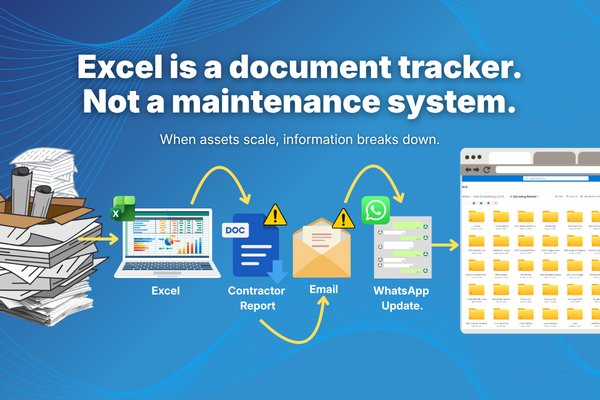
A strong FM team can handle one building with ease using manual tools. But the equation changes when you scale to 5 or 10 buildings. Coordination across thousands of assets and multiple contractors becomes chaotic. Manual systems do not just slow you down at scale; they break.
To solve these challenges, property operators are adopting platforms like ServeDeck. By moving toward digital workflows, you gain Asset Lifecycle Tracking and Operational Dashboards that provide the bird’s-eye view needed to standardise workflows across a portfolio.
How Preventive Maintenance Software Improves Building Operations
As commercial buildings become more complex, facility teams are adopting preventive maintenance software to manage operations more effectively. This shift allows facility managers to automate maintenance schedules, track asset performance, and manage work orders through a centralised platform.
Instead of relying on spreadsheets, maintenance activities are scheduled automatically and assigned to technicians digitally. This improves operational visibility by allowing teams to track:
-
Scheduled PM tasks and technician progress in real-time.
-
Maintenance response times and repair history.
-
Contractor performance and service quality.
-
Checklist execution accuracy, as the app can be configured to require live photo or video capture as part of task completion, ensuring work is verified on-site rather than recorded retrospectively.
Conclusion: The Future is Centralised
Preventive maintenance did not fail; the manual workflow did. In an era of complex, high-rise environments, data cannot stay fragmented. The future of facility management requires digital workflows, centralised asset data, and real-time visibility.
By turning PM from a checklist exercise into a living operational system, you are not just "fixing things." You are protecting the long-term value and reliability of your building.
Key Takeaways for Facility Managers
-
Centralise Communication: Move away from messaging tools and email to avoid losing maintenance history.
-
Automate Scheduling: Use software to trigger PM tasks based on asset requirements rather than manual Excel reminders.
-
Audit for Quality: Shift from "ticking boxes" to analysing asset health reports to prevent reactive repairs.
SHARE THIS POST:
Comments (0)
Leave a Reply
Your email address will not be published. Required fields are marked *