

The Hidden Layer Connecting Facility Operations: Why Work Orders Tie Everything Together
Walk through any busy corporate building and you will usually find the same pattern: asset info in one system, preventive maintenance schedules tracked separately, spare parts recorded in a storeroom logbook, work requests arriving through a chat group, vendor reports filed as PDF attachments days after the job was done.
Nobody planned it this way. It tends to happen as teams grow without a proper system, and each department just wants to solve its immediate problem with whatever tools it can find.
The issue often isn't that these records exist in different places. It's that when a fault occurs, it cuts across all of them at once. A single defect can involve a tenant request, an asset check, a scheduled maintenance trigger, a technician, an external contractor, spare parts, an SLA deadline and a closure requirement.
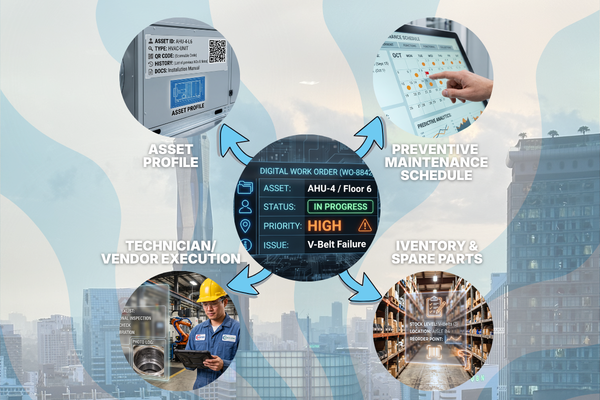
The information needed to handle that job is spread across several systems, with rarely a clean way to bring it all together. That's the role the work order was always meant to play, holding everything together from the moment a task is raised to the moment it's properly closed.
The work order is where planning becomes action
Consider this common example. A tenant reports that a meeting room is uncomfortably warm. The request identifies the location; a technician comes in and rectifies the problem.
Unfortunately, rectifying the problem immediately is the easy part. Solving it long term means identifying the correct air-conditioning unit, checking whether the fault has happened before, reviewing the last service, assigning the right technician, tracking the response against the SLA, and figuring out whether a part or external vendor is needed.
A useful work order carries that context through the entire job, capturing where the work came from (a tenant request, inspection, feedback or preventive maintenance schedule), the location, area and asset affected, the priority, SLA, assignee and any external vendor involved, and the tasks, notes and communication that build up as the job progresses.
It also holds the spare parts, materials and labour time used, along with the completion status and verification once the work is closed. Without that connected record, the technician may still restore the air-conditioning. The wider organisation, though, learns very little from the event.
1. Connecting work orders to asset history

An asset register can tell a technician the model, location, serial number and warranty status of a pump, lift or generator set. It only becomes strategically valuable once actual maintenance activity is attached to it: how often the equipment has failed, whether the same component keeps getting replaced, whether an asset is repeatedly repaired when it should already be considered for replacement.
If work orders remain separate from the asset record, these patterns are easily missed. Repairs become isolated events, and lifecycle decisions get made through memory, scattered reports or incomplete spreadsheets rather than evidence.
As covered in our earlier piece, Asset Lifecycle Management: Why ROI Breaks Down at Scale, asset ROI starts to break down when operational history, cost information and maintenance activity are fragmented. A connected work order turns each repair into usable lifecycle data, giving teams a clearer basis for repair-versus-replacement decisions.
2. Turning preventive maintenance schedules into verified execution
Preventive maintenance starts with a plan, but a calendar entry doesn't prove the work was done properly. A scheduled task still has to be assigned, performed, checked and closed, and the work order is what carries the PM instruction from the schedule to the technician and records what actually happened on-site.
Manual PM processes often collapse into tick-the-box exercises. A checklist gets signed, a PDF gets filed, the schedule shows "completed", while recurring defects or poor-quality servicing stay hidden underneath.
As we discussed in Preventive vs Corrective Maintenance in Commercial Buildings, preventive maintenance often becomes a tick-the-box exercise when schedules, reports and actual asset condition remain disconnected.
A connected work order creates a clearer execution trail through timestamps, task details, technician updates, photos or videos, and documented exceptions. If a technician finds an additional defect during inspection, a follow-up corrective task can be created without losing the original context.
3. Connecting inventory movement to actual maintenance work
Inventory records show what's believed to be available in the storeroom. Work orders explain why stock actually moved.
When a technician replaces a filter, belt, battery or pump component, that material usage should tie back to the specific job and asset; otherwise, the physical repair happens while the inventory balance sits untouched. This is how small shortcuts snowball into bigger discrepancies. A part gets taken urgently because the manager is breathing down someone's neck, and the logbook is meant to be updated later, though ironically, it's often forgotten or filled in incorrectly.
Case in point: a supervisor grabs chemicals while the storekeeper is out, or a technician borrows a component from another site to make a deadline. Each is understandable in the moment; together, they erode how reliable the inventory record actually is.
Linking requisitions and material usage to the work order gives the movement a reason, an owner and operational context. It supports more accurate replenishment, purchasing and consumption analysis, and reduces the risk that missing stock only turns up during the next emergency.
4. Creating accountability across technicians, vendors and SLAs
A work order also connects the people responsible for resolving the issue.
In a manual environment, assignment often happens verbally or over a chat group: a supervisor sends a message, a technician replies when available, an external contractor sends a separate report later. The task eventually gets done, but managers have limited visibility into who accepted the work, when it started, whether it was on time or late, and why it was delayed if it was.
A structured workflow creates a single operational record instead. Internal technicians or external vendors can be assigned, overdue tasks escalated, and relevant users notified as the status changes. This doesn't eliminate the need for communication; instead, it puts that communication inside the context of the job, so updates, decisions and evidence stay attached to the work order rather than disappearing into unrelated message threads.
5. Turning maintenance activity into management intelligence
At small scale, a facility manager might know most recurring issues personally. That intuition gets less reliable as the number of buildings, assets, vendors and monthly tasks grows.
A leading Malaysian property developer featured in ServeDeck's earlier asset lifecycle article manages more than 13,000 assets and handles over 16,000 maintenance work orders every month. At that volume, work orders can't stay simple job tickets; instead, they become one of the organisation's most important sources of operational data.
When records are complete and connected, management can look past how many jobs were opened and closed and start seeing patterns: recurring asset failures, response and resolution trends, spare-part consumption, vendor performance, maintenance costs and bottlenecks across sites. None of that works if the underlying workflow is weak: a dashboard can't compensate for work orders that lack asset references, completion evidence, accurate timestamps or material usage. That structure has to be captured while the work is actually happening, or it won't be accurate.
That includes which assets or locations generate the most corrective work, which faults keep repeating despite previous repairs or preventive servicing, and where response or resolution times consistently fall behind. It also includes which technicians or vendors handle particular work categories, which parts and materials get consumed most frequently, and how all of that maintenance activity feeds into operational cost.
What disconnected work orders look like in practice
Many organisations technically have all the information they need, but ironically, it's just stored in separate places. The complaint sits in a tenant request portal or chat group. The asset details live in a spreadsheet somewhere else. The PM schedule sits in another tracker entirely, while spare-part movement gets logged by hand and the vendor report shows up as a PDF attachment. Finance reviews the costs separately, on its own timeline.
Each record may be individually correct, yet the organisation still ends up without a complete view of the maintenance event. This fragmentation creates repeated data entry, inconsistent updates and blind spots between departments. The repair gets done, but the information needed for future planning stays scattered.
How ServeDeck connects the work order workflow
ServeDeck's Work Order Management module is built to manage corrective and unscheduled maintenance from creation through closure while keeping the relevant operational context visible.
Teams can create work orders by scanning asset or area QR codes, link information originating from preventive maintenance, work requests or feedback, assign work internally or externally, and add requisition subtasks when materials or purchasing support are required.
Automatic escalation based on SLA categories, notifications and live messaging help teams follow critical tasks as they progress. Managers and supervisors get real-time oversight of unassigned, ongoing and overdue work instead of relying on separate updates from each person involved.
Going digital isn't really the point. What matters is that the issue, asset, maintenance activity, inventory movement, people and completion record all stay part of the same operational workflow.
An anonymised example of work orders at scale

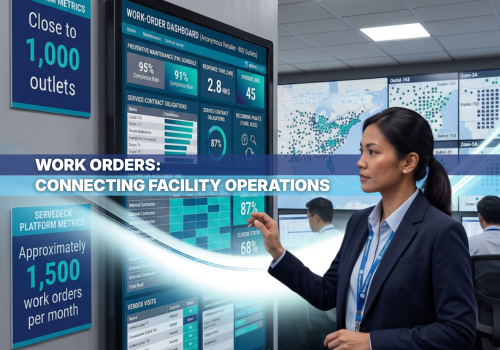
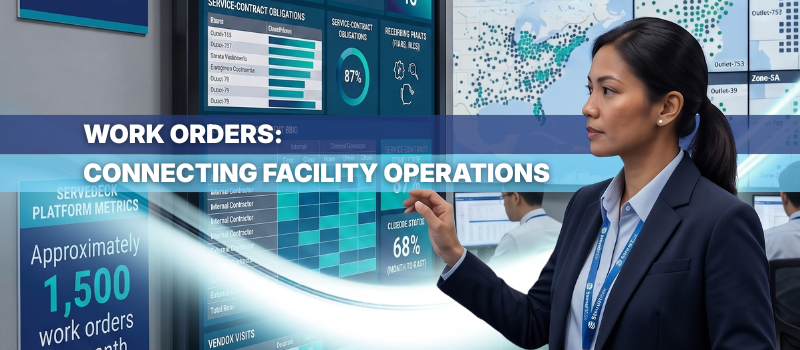
An anonymised case study from a large multi-outlet retailer shows how this connected workflow supports maintenance at scale. The organisation manages close to 1,000 outlets and relies on work orders extensively to execute preventive maintenance and coordinate service-contract obligations across its network.
A typical operation might generate around 300 work orders in a month. This retail network reaches closer to 1,500. Scheduled servicing, corrective jobs and vendor visits all run through the same workflow, giving HQ teams visibility into whether technicians and contractors acknowledged the work, responded on time, completed the required tasks and met their service-contract terms.
At this scale, the work order stops being just a ticket. It connects preventive maintenance schedules and contractual responsibilities to outlet condition, technician and vendor performance, repeat faults and closure quality. It is this kind of visibility that helps management catch overdue work or inconsistent service before it affects outlet operations or the experience of store teams and customers.
- Create work orders quickly through asset and area QR codes
- Retain context from preventive maintenance, work requests and feedback
- Assign internal technicians or external vendors
- Create requisition subtasks for materials and purchasing needs
- Use SLA-based escalation, notifications and messaging
- Track work from initiation to verified closure
Conclusion: the hidden layer connecting everything
Asset management, preventive maintenance and inventory management remain essential functions on their own. Their value weakens, though, when the actual work performed on-site never connects back to them.
The work order is what ties planning, execution and evidence together. It turns an asset record into a maintenance history, a PM schedule into verified work, an inventory movement into accountable usage, a technician update into measurable operational performance.
For facility teams managing complex buildings or multiple sites, work order management shouldn't be treated as another administrative module. It's the operational backbone that lets the rest of the system work as one.
See how ServeDeck turns every work order into connected operational data. Request a demo to explore the workflow.
Key Takeaways
- A work order is the operational record that connects requests, assets, PM schedules, inventory, technicians, vendors and closure evidence.
- Closing a task isn't enough if the resulting asset history, material usage and performance data stay incomplete.
- Connected work order data helps facility managers identify recurring failures, SLA issues, inventory consumption and maintenance cost at scale.
- Digital workflows are most valuable when they connect operational functions, not just replace a paper form with a screen.
- An anonymised case study of a retailer managing close to 1,000 outlets and around 1,500 monthly work orders shows why preventive maintenance, service contracts and performance visibility need to stay connected through a structured workflow.
SHARE THIS POST:
Comments (0)
Leave a Reply
Your email address will not be published. Required fields are marked *