

Smart Building IoT Integration: From Data to Action
The Living Building: Where Building Data Meets Building Operations
Walk into any modern office, shopping mall, or transit station, and you’ll find a hidden network of systems working around the clock.
Chillers control the air, energy meters track power use, digital locks secure doors, and sensors monitor temperature, water levels, humidity, and air quality.
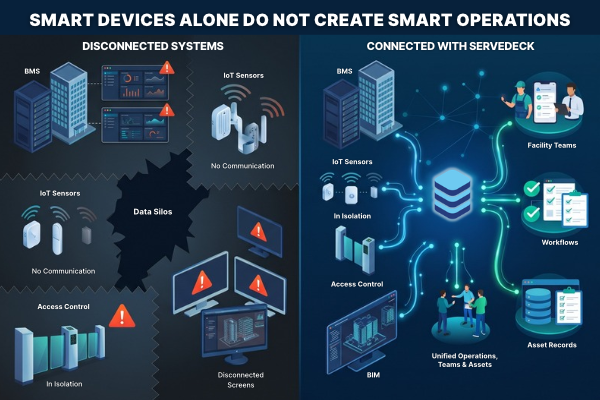
IoT has made buildings smarter by turning all this activity into data. But the data often stays in separate systems — the BMS, energy monitors, access control, and building models each have their own screens.
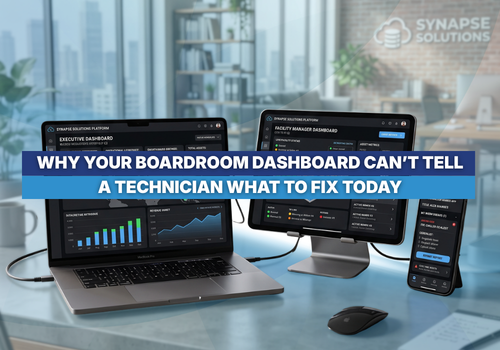
When something goes wrong, someone still has to check different systems, connect the information, and decide what action to take.
A sensor can detect a sudden temperature spike or a drop in a water tank level, but it cannot fix the problem itself. Until the alert reaches someone who can act, all that “smart” technology is just another screen in a control room.
What IoT Makes Possible
The examples below come from buildings ServeDeck works with. Each one shows a different corner of the connected building.
- Building management (BMS): At one large commercial development, a leading BMS platform controls the core systems across its business towers, including the air handling units.
- Environmental and energy sensors: A public-sector office uses IoT sensors to monitor energy use, HVAC performance, room humidity and ozone levels.
- Water tank monitoring: At a shopping mall, hydrostatic sensors on the water tanks measure tank levels.
- Facial recognition access: In a business tower, existing tenants are already enrolled, so the auto gate recognises them on arrival. A new visitor registers their face and IC temporarily near the reception desk. The registration is valid for that day only, and the data is removed after six months.
- BIM: At a public infrastructure facility, the BIM model shows the whole building with its assets tagged in place.
IoT has changed what a building can tell you. Sensors can provide valuable data for troubleshooting, asset maintenance and predictive decision-making when that data is properly connected to facility operations.
When Smart Buildings Still Rely on Manual Response
Each system reports on its own patch. The BMS can tell you a cooling coil is failing. It does not know which field technician is nearby, who has the right spare parts, or how to log the history of that repair for next year’s budget.
When these systems sit on separate screens, the alert waits to be noticed. Someone in the control room has to see it, work out what it means, write down the details, send a message or call a technician, log a job sheet by hand and remember to follow up later.
When information lives in silos, response times slow down, energy gets wasted, and simple fixes turn into expensive repairs.
ServeDeck: Connecting Building Data to Action
ServeDeck sits between the systems that generate building data and the teams that run the building. This approach to connecting BAS, IoT and BIM with daily facility operations is explored further in our guide to BAS and BIM integrations.
Think of it as two layers.
The Data Layer covers everything that senses, controls, identifies or models the building: the BMS, IoT sensors, facial recognition and BIM.
The Operations Layer covers the people and the work: work requests, approvals, technicians and asset history.
ServeDeck connects the two, so a signal from the data layer arrives in the operations layer as a work request the team can act on.
How the Connected Workflow Operates
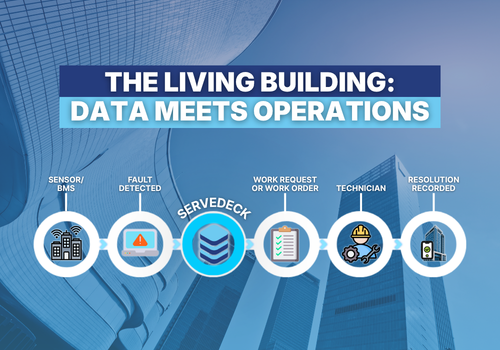
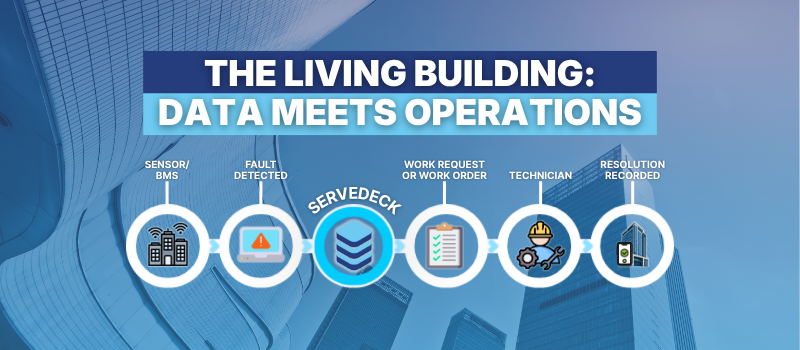
The flow runs in four steps:
- Detect: Sensors and IoT gateways capture an abnormal condition, such as a water pump failure, a sudden pressure drop, or an HVAC temperature fault.
- Raise: The integration layer passes the fault data into ServeDeck, where it becomes a work request or, depending on the workflow, a work order.
- Approve and Dispatch: Where the workflow calls for it, the FM team reviews and approves the request. The resulting work order goes to the nearest field technician’s mobile, tablet or desktop app.
- Resolve and Record: The technician inspects the asset, updates the job status on their mobile device, and the fix is recorded in the asset’s permanent history.
The workflow decides whether a request waits for FM approval or goes straight to a work order, and nobody has to key details in by hand.
The Bridge in Practice
The table below shows how each example connects the building data layer with day-to-day facility operations.
| System | Signal from the Data Layer | What Happens in ServeDeck |
|---|---|---|
| BMS (Commercial Development) | AHU fault | Raised as a work request for the FM team to approve |
| Water Tank Monitoring (Shopping Mall) | Hydrostatic sensor reading outside its parameters, checked in a middleware layer | Raised as a work request or a work order, depending on the workflow |
| IoT Sensors (Public-Sector Office) | Fault detected | Raised as a work request |
| Facial Recognition (Business Tower) | Enrolment and entry data | Routed through ServeDeck, so access is managed alongside maintenance |
| BIM (Public Infrastructure Facility) | Asset tags in the model | ServeDeck supplies the asset records shown in the model |
Real-World Applications
Commercial Development: At the commercial development, the BMS detects an air handling unit fault and ServeDeck automatically turns the alarm into a work request. The FM team approves it, and it becomes a work order for the technician, no manual monitoring or data entry required.
Shopping Mall: At the shopping mall, hydrostatic sensors monitor water tank levels. When readings fall outside set limits, middleware sends the alert to ServeDeck, which creates a work request or work order based on the workflow. This helps detect issues such as pump failures or leaks before they cause supply problems or overflow.
Public-Sector Office: At the public-sector office, IoT sensors monitor energy use, HVAC, humidity and ozone levels. When a fault is detected, the data is sent to ServeDeck and automatically creates a work request, without anyone needing to spot the issue on a screen.
Business Tower and Public Infrastructure: The bridge also carries information in both directions. At the business tower, the access data from facial recognition is routed through ServeDeck, so the building team manages tenants, visitors and vendors on the same platform that runs its maintenance.
At the public infrastructure facility, the flow goes the other way: ServeDeck holds the asset records, and the BIM viewer shows them against the building model, with each asset tagged in place.
Bringing It All Together
Having a building full of sensors only matters if your team can act on what those sensors find.
ServeDeck sits between the systems that generate building data and the teams that run the building, so every signal reaches someone who can act on it.
Building owners and property teams keep the BMS, sensors, access control and BIM models they already have, and gain a single place where every alert becomes a trackable request, keeping operations running smoothly, cutting energy waste and extending the life of every asset in the building.
Key Takeaways
- Connect Your Data: Do not let BMS and IoT alerts get stuck on control room dashboards. Feed them through an integration layer into operational workflows.
- Keep People in Control: Turn equipment faults into work requests or work orders, following the approval workflow your FM team sets, and dispatch them to technicians’ mobile devices.
- Bridge Both Layers: Treat data and operations as two layers, and use one platform to join them.
- Carry Data Both Ways: Signals flow into work requests, and asset records flow back into tools such as BIM viewers.
- Focus on Outcomes: Technology is only as good as the action it creates. Prioritise quick resolution times and clear asset histories before adding more devices.
Next Step
Ready to turn building data into operational action?
Explore ServeDeck's IoT Integration solutions or request a demo to discover how connecting BMS, IoT sensors and BIM with daily facility workflows can help your team respond faster, improve operational visibility and manage building assets more effectively.
SHARE THIS POST:
Comments (0)
Leave a Reply
Your email address will not be published. Required fields are marked *